Tape Measure: AR Measuring
- 4.3
- Rating
- 1.00M
- Installs
- Free
- Price
 Analysis by App-foxy
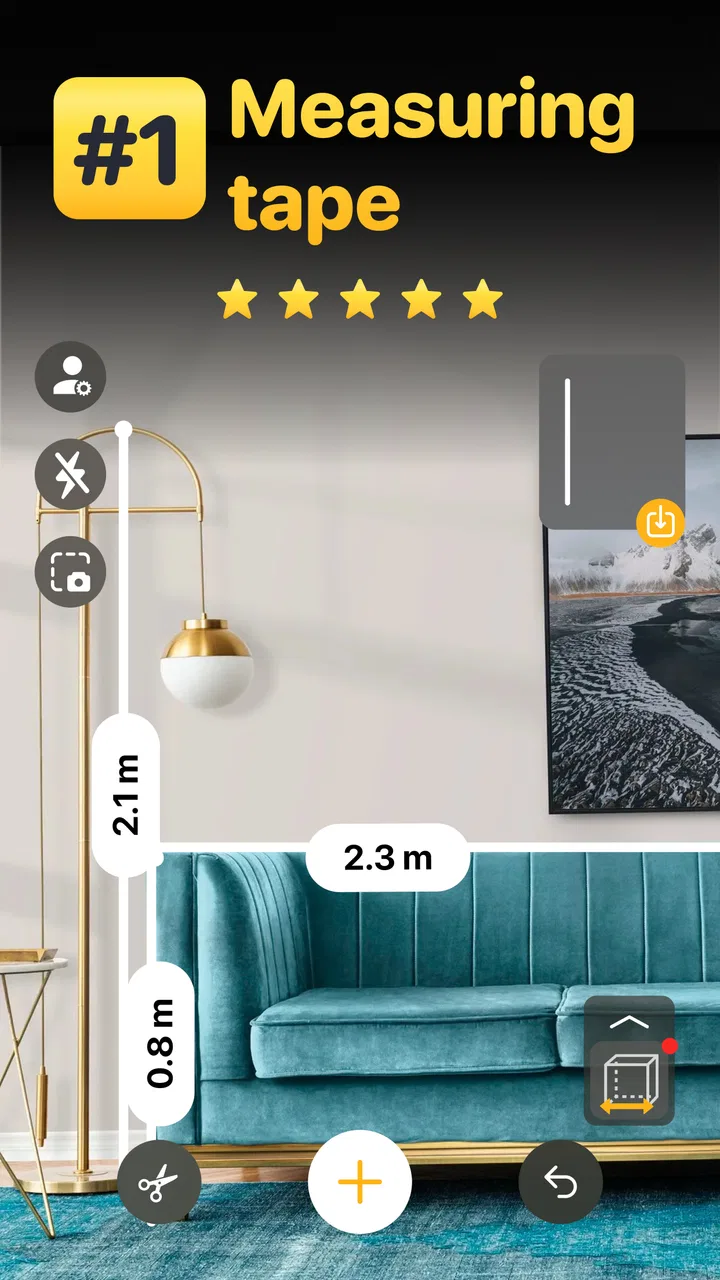
I tried Tape Measure: AR Measuring as a quick tool for situations where a physical tape is not within reach. It is an Android measuring app from AppTitude Technologies OU, placed in the tools category and available for free. The basic idea is simple: use the phone’s camera and augmented-reality guidance to estimate the size of something in front of you instead of reaching for a separate ruler.
That sounds modest, but it can be useful at exactly the right moment. I can imagine opening it while checking whether a small shelf will fit beside a desk, estimating the width of a parcel, or getting a rough idea of the height of a cabinet before looking for a proper measuring tool. It is not a replacement for careful trade work, yet it can remove a surprising amount of guesswork from ordinary decisions.
How the AR measuring experience feels in everyday use
The first thing I would keep in mind is the word “quick.” This is best approached as a convenience tool, not as a precision instrument. An AR ruler depends on the phone’s camera view, the surface being observed, the way the device is held, and the user’s ability to place the virtual endpoints consistently. When those conditions cooperate, the result can be handy. When they do not, the reading deserves a second check.
You May Also Like

 Blood Strike: 2.5 Anniversary
Blood Strike’s Loadouts Turn Every Drop Into a Tactical Gamble
A close look at Blood Strike’s custom loadouts: how fast access to signature weapons reshapes its battle royale rhythm, rewards preparation, and narrows the gap between fights.

 Pandora - Music & Podcasts
Pandora’s Music Is Easy to Start, but Harder to Recover
Pandora’s strength is its low-effort path from a seed to a station. Its weak spot is how much confidence it asks you to place in connection, setup, and quiet recovery.

 8 Ball Pool
 Is Built on Rivalries, Rematches, and Routine
A close look at the rivalries, rematches, shared routines, and unanswered safety questions that turn a quick pool match into a persistent mobile community.

 Samsung Music
’s Quiet Strength Is Playing What You Already Own
Its reach comes less from spectacle than from dependable access to a personal library. That simplicity is both the app’s strongest retention engine and its ceiling.

 AccuWeather: Weather Radar
AccuWeather Review: A Quick, Clear Forecast for Everyday Decisions
For everyday plans, the best forecast is the one you can understand quickly. AccuWeather makes rain timing, radar, and local conditions easy to act on, with a few trade-offs.

 Hill Climb Racing
Why Hill Climb Racing Still Turns Crashes Into One More Run
A tiny car, a bumpy hill and one more upgrade: Hill Climb Racing keeps resurfacing because its simple chaos makes every near-miss feel personal.
More From Our News Desk



For a casual measurement, I would begin by clearing the area around the object and moving the phone slowly. A rushed sweep makes it harder to judge where one end finishes and the other begins. Good lighting also matters in practical use because the camera needs to distinguish the object from its surroundings. These are not special tricks for one particular room; they are the habits that make this kind of AR tool more dependable.
A realistic example would be shopping for a narrow storage unit. I could measure the open space beside a wardrobe, note the approximate width, and compare it with the product dimensions before ordering. That saves a trip to the hardware drawer. I would still use a physical tape before drilling, cutting, or placing an expensive item, but the phone is perfectly suited to the earlier “will this probably fit?” stage.
The same distinction applies to moving furniture. If I am trying to decide whether a chair can pass through a doorway, a quick estimate of the chair’s width and the opening can help me plan. However, the angle of the phone can make a doorway appear misleading, and measuring along an uneven floor or against a rounded object is less trustworthy. The app gives me a practical starting point, not a guarantee.
Where a phone-based ruler is genuinely convenient
The strongest use case is temporary measurement. I do not need to carry a tape measure while browsing a flea market, visiting a friend’s apartment, or inspecting a second-hand table. If my phone is already in my hand, opening a free tool is easier than searching for a physical ruler that may be in another room.
It can also help with rough planning. Before buying picture frames, arranging plants, or checking whether a box looks suitable for a particular shelf, an approximate reading is often enough. In these cases, the app’s value comes from speed and availability rather than laboratory-level accuracy.
Another useful workflow is taking several readings instead of trusting the first one. I would measure the same edge from a slightly different position, compare the results, and treat a consistent range as more meaningful than a single number. If the readings vary widely, that is a clear sign to switch to a physical tape or another measuring method.
That workflow is especially important for objects with unclear boundaries. A soft bag, a curved lamp, or a dark item against a dark background can be difficult to place accurately in an AR view. Measuring a straight, visible edge is much easier than trying to define the outermost point of something irregular.
What the free access means for value
Tape Measure: AR Measuring is free to install, which makes trying it low-risk. I can test whether the camera-based approach suits my phone and my typical needs without paying at the door. That matters for a tool whose usefulness depends heavily on personal habits: someone who often needs rough dimensions may open it regularly, while someone who owns a tape measure may rarely return to it.
There are in-app purchases listed from $4.99 to $34.99 per item. I would therefore separate the free access from the paid value rather than assuming that every useful capability is included at no cost. The free starting point is easy to justify for occasional estimates, but I would only consider spending money after using the app enough to understand what extra value a purchase would provide in my own routine.
That is the sensible buying approach here because a measuring app has a very clear alternative: a basic physical tape. A paid upgrade would need to offer a meaningful improvement in convenience for me, not merely the promise of a more polished experience. If I only measure something once every few months, the free option or a drawer tape is likely the better financial decision.
On the other hand, someone who frequently visits properties, checks furniture dimensions, or works through home projects may value having an always-available tool on a phone. Even then, I would treat the purchase as a convenience expense. It should not replace a proven measuring instrument for work where a small error could cause wasted materials or an expensive mistake.
Accuracy, surfaces, and the tradeoff behind AR
The central tradeoff is convenience versus control. With a physical tape, I can hook or hold one end, keep the tape straight, and read a marked scale directly. With AR, I gain speed and flexibility, but I also introduce camera perspective and placement judgment into the process. That makes the app attractive for estimates and less suitable for exact fabrication.
I would be particularly cautious with long distances, narrow edges, reflective surfaces, and cluttered rooms. A phone camera may struggle to give me a clean visual reference when the endpoint is partly hidden. The same applies to measuring from an awkward angle. If the object matters enough that I would be upset by a small error, I would verify it with a physical tape.
There is also a human-factor issue: a digital result can look authoritative even when the setup was poor. I would avoid writing down a reading immediately. First, I would reposition the phone, repeat the measurement, and check whether the result makes sense compared with a familiar object nearby. This simple pause prevents the screen from creating false confidence.
For a flat tabletop, a clear wall section, or a visible box, the experience should be easier to interpret than for a complicated object. I would start with those simple cases when learning the app. That gives me a feel for how stable the AR view is on my device before I rely on it in a more demanding situation.
Practical tips that make the app more useful
Measure from both directions when possible. If I get noticeably different readings, I treat that difference as information about the setup rather than choosing the more convenient number.
Use a reference object for a quick sanity check. A familiar card, tile, or standard sheet can reveal whether the scale looks broadly believable before I measure something important.
Separate planning measurements from final measurements. I use the app to decide what deserves closer attention, then bring out a physical tape for installation, cutting, or ordering a tight-fitting item.
Keep the phone movement slow and deliberate. A steady camera view makes endpoint placement easier than sweeping quickly across the room.
These habits are more valuable than simply opening the app and accepting the first result. The tool’s strength is not that it removes judgment; it makes a useful estimate available when I would otherwise have no measurement at all.
How it compares with familiar alternatives
The obvious comparison is a conventional tape measure. The physical tool wins for repeatable accuracy, long-term reliability, and jobs involving construction or installation. It also works without a phone battery or camera view. If I already have one nearby, I would choose it for anything involving cutting wood, positioning wall fixtures, checking appliance clearances, or confirming a purchase with tight dimensions.
A standard ruler is better for short, flat objects on a desk. It is easier to align and read, especially when I need a dependable small measurement. Tape Measure: AR Measuring becomes more appealing when the object is too large for a ruler or when I need a fast estimate away from my usual tools.
Manual visual estimation is the least dependable option, even though people use it constantly. The app improves on guessing by giving me a structured way to inspect the object and produce a number. That is a real benefit, but it should not be confused with professional surveying equipment or a calibrated instrument.
Its place is therefore between “I will just guess” and “I need exact dimensions.” That middle ground is broad enough to make the app worthwhile for many households, but not broad enough to justify treating it as the only measuring tool in a workshop.
Who will get the most from it
I think the best audience is people who want an emergency ruler on their phone. Renters checking room layouts, shoppers comparing furniture sizes, students measuring items for a project, and anyone organizing a home can all benefit from the convenience. The free entry point makes it easy to see whether the workflow fits before considering any paid option.
It may also suit people who dislike carrying extra tools. A phone is already part of most everyday errands, so an AR measuring app can be useful when a tape measure would be inconvenient. For occasional home planning, that accessibility is more important than advanced technical features.
I would recommend caution for tradespeople, contractors, installers, and serious DIY users who need dependable repeatability. They may still appreciate the app for a preliminary check, but the final decision should come from a proper tool. The same advice applies to anyone measuring for a custom cut, a safety clearance, or a costly delivery.
People who prefer simple, tactile tools may also skip it. A physical tape has no camera framing to manage and no need to interpret an augmented view. If the goal is to measure the same types of objects repeatedly and accurately, the traditional alternative is more direct.
Compatibility, maturity, and everyday expectations
The app requires Android 9 or later, so it is aimed at a broad range of relatively modern Android phones rather than very old devices. The current version is 1.1.7, and the project was released on April 21, 2025. I would read that as a fairly recent tool and give it a little practical testing time on my own handset before depending on it for an important task.
Its audience appears substantial: the app has passed one million installs, with an average rating of 4.3 from around sixteen thousand ratings. Those figures suggest that many users find the concept useful, though they do not change the basic limitation of camera-based measurement. Popularity can make an app worth trying; it cannot turn an estimate into a certified dimension.
The age rating is Everyone, which fits the straightforward nature of a measuring utility. The developer is AppTitude Technologies OU. For me, the more important question than the label is whether the app feels dependable in the particular rooms and lighting conditions where I expect to use it. A quick personal test is more informative than assuming every phone will behave identically.
I would also keep the purchase structure in mind. Free access is enough to evaluate the core idea, while the listed in-app purchase range means paid options should be considered separately from the no-cost trial experience. I would not pay simply because I need one measurement today; I would pay only if repeated use makes the convenience genuinely valuable.
My recommendation after weighing the tradeoffs
Tape Measure: AR Measuring is worth trying when convenience matters more than exact precision. I like the idea of having a quick measuring aid available during shopping, moving, decorating, and early-stage planning. The free installation lowers the barrier, and the app can replace unhelpful guessing in situations where a physical tool is absent.
My recommendation changes for precision work. I would not use it as the final authority for cutting materials, mounting hardware, ordering a tightly fitted appliance, or checking a safety-critical gap. In those cases, a physical tape or a more specialized instrument is the better choice, even if it takes longer to retrieve.
For most casual users, I would start with the free experience, test several simple objects, repeat readings, and decide whether the convenience earns a regular place on the phone. I would leave the paid options alone until I understood exactly how often I use the tool and what additional value I receive. That makes the decision practical rather than impulsive.
Overall, this is a useful pocket alternative to guessing, not a universal replacement for a tape measure. If I wanted a fast estimate while standing in a shop or rearranging a room, I would be happy to have it installed. If I were beginning a serious build or needed a measurement that must be right the first time, I would reach for the traditional tool instead.
FAQs for Tape Measure: AR Measuring
01What is Tape Measure: AR Measuring, and how does it work?
Tape Measure: AR Measuring is a mobile utility that uses augmented reality to estimate the length, height, or distance of real-world objects through your phone’s camera. After opening the app, you generally point the camera at a suitable surface, mark starting and ending points, and let the application calculate the measurement. It is designed for quick estimates rather than professional surveying.
02Does Tape Measure: AR Measuring provide accurate measurements?
The app can be useful for approximate measurements, but its accuracy depends on your device’s AR capabilities, lighting, surface texture, camera stability, and how carefully you place the measurement points. During testing, results are more dependable on clearly visible, flat surfaces with good lighting. Users should not rely on it for construction, engineering, medical, or other situations where exact measurements are essential.
03What devices and permissions are required to use the app?
Tape Measure: AR Measuring requires a smartphone or tablet with a camera and compatible augmented-reality features. The application normally needs camera access so it can view the environment and calculate distances. Depending on the version and operating system, it may also request motion or sensor access. Review the permissions before installation, and remember that older devices may offer limited functionality or may not support AR measurements.
04Can I measure furniture, walls, rooms, or a person’s height with this app?
The app is intended for measuring everyday objects and spaces, including approximate dimensions of furniture, walls, floors, and other visible surfaces. Some versions may also include options for measuring height or recording several points in one session. Results can vary significantly when objects are reflective, very dark, distant, or partially hidden. For large rooms or irregular shapes, take multiple readings and compare them with a conventional tape measure.
05Is Tape Measure: AR Measuring free to download, and does it contain ads or in-app purchases?
Availability, pricing, advertisements, and optional subscriptions can vary according to the app version, platform, and region. Before downloading, check the Google Play Store or Apple App Store listing for the current purchase details. A free installation does not always mean every feature is included without charge. Pay particular attention to trial terms, recurring subscriptions, and whether removing advertisements requires an additional payment.
Pros
- Quickly measures length
- height
- and distance using the camera.
- Useful for estimating furniture dimensions before moving or buying.
- Simple interface makes basic measurements easy to start.
- AR guides help align measurements with real-world objects.
- Convenient alternative when you do not have a physical tape measure.
Cons
- Accuracy can vary with lighting
- surfaces
- and camera positioning.
- Requires AR-compatible hardware and access to the device camera.
- Small objects and unclear edges can be difficult to measure precisely.
- Some features may be limited or interrupted by advertisements.
- Measurements should be verified for construction or other exacting tasks.

Tape Measure: AR Measuring
Gallery